
Step 1: Log in to the 7Bridges platform
- Ensure you are using an account with permission to manage users (typically an Admin role).
Step 2: Go to Account Settings
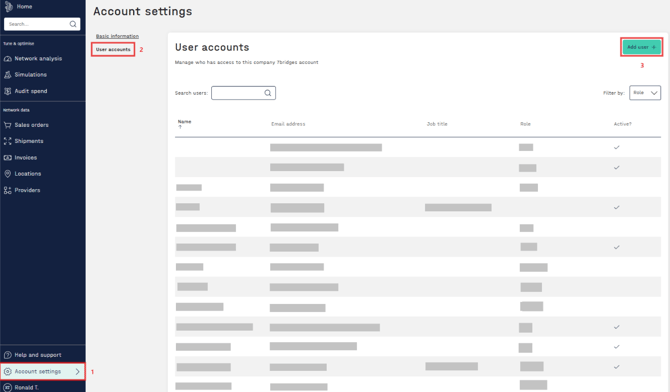
- Go to “Account Settings” from the left menu.
- Click on “User Accounts”
- Click the “Add user +” button in the top-right corner.
Step 3: Fill in User details
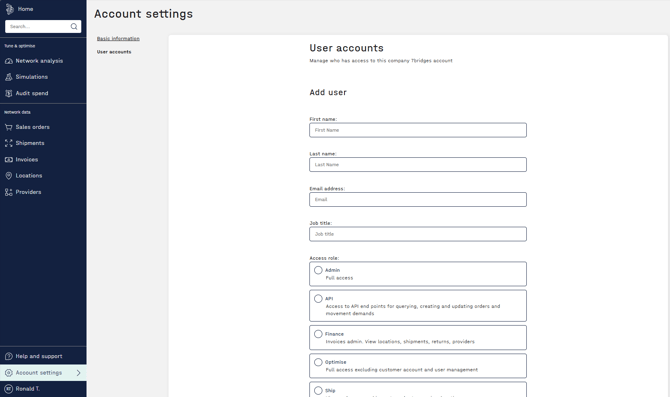
- Enter the required user details (name, email, etc.).
- In the Role field, select API. (This ensures the user is created specifically for API access)
- Click the "Save" button at the bottom.
- Once added, the account will appear in the User accounts list and a welcome email with a link to set their password will be sent to this new user
Step 4: Obtain API Credentials
- After the API user has been created:
- Notify the 7Bridges team that the API user is ready.
- We will then share the API authentication token associated with that user.
🔐 For security reasons, API tokens are issued and shared by the 7Bridges team rather than being visible directly in the UI.