DHL error messages
Account not allowed for this service
One or more validation errors occurred
Paperless shipment service is not allowed
Cannot determine destination service
Recipient street line exceeds maximum length
The requested Special Service Codes DD is not available
NoneType object has no attribute name
Invalid credentials [DHL Parcel DE]
Please enter a house number. The address could not be encoded to a routing code [DHL Parcel DE]
Must have a minimum weight value of 0.01 [DHL Parcel DE]
There must be a minimum of 1 item [DHL Parcel DE]
Code 106: Błędy walidacji przesyłki: Maksymalna kwota pobrania wynosi 6750 RON [DHL Parcel PL]
Cannot create CoD shipment as booking has no CoD values [DHL Parcel PL]
👉 Note: DHL will only discuss account-specific configuration with the account holder; therefore 7bridges Support cannot contact DHL on your behalf regarding account-specific issues.
Account not allowed for this service
This error usually indicates that the selected service is not available for your DHL account, or that there is an issue with the account configuration.
What to do:
Contact your DHL account manager to confirm that the required service is enabled for your account.
One or more validation errors occurred
This error means that one or more details provided for the shipment did not meet the required validation rules.
What to do:
Check the shipment information carefully, paying particular attention to:
Origin and destination addresses
Postcodes
Items
Package and product weights
If the information appears correct but the error continues, contact 7bridges Support and provide the shipment reference and full error message.
Paperless shipment service is not allowed
This error means that DHL Paperless Trade cannot be used for the shipment. This may be because:
i. The destination country does not support DHL Paperless Trade;
ii. The selected DHL product does not support paperless shipments; or
iii. The shipment's declared value exceeds DHL's applicable limit.
What to do:
If you are unsure why Paperless Trade is unavailable for your shipment, contact your DHL account manager for further information.
Cannot determine destination service
This error means that DHL cannot identify an available service for the destination address.
What to do:
Check that the recipient address is correct by checking your records and, if necessary, using an online mapping service such as Google Maps.
Check the postcode carefully, including the country-specific postcode format. If necessary, cross-check the address and postcode using a reliable postcode or address finder for that country.
If the address is correct, select a different available service from the Shipping Methods tab.
If no alternative provider or service is available, contact 7bridges Support for assistance.
Recipient street line exceeds maximum length
Error message examples:
Error Path: /dataElement/cPAN/addresses/recipient/street1Nr
Error Message: Value is longer than maximum length
This error means that the information provided in the recipient’s Address Line 1 exceeds the maximum length accepted by the shipping service.
What to do:
Shorten the recipient’s Address Line 1 while ensuring that the street name and house number remain clear and correct.
Move unit numbers, “c/o” details or other building information to Address Line 2, where appropriate, and try booking the shipment again.
If the address and postcode are correct and the error message persists, contact 7bridges Support for assistance.
The requested Special Service Codes DD is not available
This error means that DHL does not support the required DDP service for the destination address.
What to do:
Select another available provider for the shipment.
Do not change the Incoterm to resolve the booking error. The Incoterm is determined by the shipment requirements and changing it may affect the charges applied to the shipment.
If you believe DHL should support DDP for this destination, contact your DHL account manager for further information.
'NoneType' object has no attribute 'name'
This error usually indicates an issue with the configuration of the selected DHL account.
What to do:
If another DHL account is available, try booking the shipment using that account.
If the error continues or no alternative account is available, contact 7bridges Support and provide details of the account and shipment affected.
Invalid credentials [DHL Parcel DE]
This error means that the credentials used to authenticate the DHL account have not been accepted.
What to do:
Contact your DHL account manager to confirm that the credentials are valid and that the account is authorised to use the required service.
Please enter a house number. The address could not be encoded to a routing code [DHL Parcel DE]
This error means that DHL Parcel DE cannot correctly identify the house number from the address provided. This can occur when the address contains special characters or when additional address information is included on the same line as the street name and house number.
What to do:
Check both the origin and destination addresses by checking your records and, if necessary, using an online mapping service such as Google Maps. In addition:
i. Remove special characters such as periods (.), slashes (/) or commas (,).
ii. Ensure Address Line 1 contains only the street name and house number.
iii. Move unit numbers, "c/o" details or other building information to Address Line 2.
Example:
❌ Incorrect:
Otto Hahn Straße 1, Ingolstadt Village, Unit 49
✅ Correct:
Address Line 1: Otto Hahn Straße 1
Address Line 2: Ingolstadt Village Unit 49
For API bookings:
Ensure the origin and destination addresses in your booking request follow the same formatting requirements.
Must have a minimum weight value of 0.01 [DHL Parcel DE]
Error message examples:
Params.CN22Info[0].Weight: Must have a minimum value of 0.01, Params.CN22Info[1].Weight: Must have a minimum value of 0.01
This error means that a shipment created via API has a product and/or package weight of 0.
What to do:
Check the product and package weights included in the API request and ensure that a weight greater than 0 has been provided.
The API value takes precedence; therefore, the weight must be corrected in the API request.
Item field example: 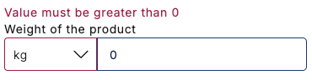
Package field example: 
👉 Note: It is not possible to enter 0 as a valid item or package weight directly in the 7bridges software.
There must be a minimum of 1 item [DHL Parcel DE]
Error message example:
Params.CN22Info: There must be a minimum of 1 items in the array
This error means that a shipment created via API does not have any items associated with it.
What to do:
Check that the item quantity and weight are correctly displayed in the source system and update the booking.
The API value takes precedence; therefore, the item must be added in the API request.
👉 Note: The issue will not be resolved by entering the item directly in the 7bridges software.
Code 106: Błędy walidacji przesyłki: Dla Węgier wartość pobrania w lokalnej walucie forint węgierski (HUF) powinna być wyrażona wartością całkowitą [DHL Parcel PL]
Code 106: Shipment validation errors: For Hungary, the CoD amount in the local currency, Hungarian Forint (HUF), must be expressed as a whole number.
This error means that the CoD value in Hungarian Forint (HUF) must be a whole number, with no decimal places.
What to do:
Check the CoD value in your source system and ensure that it is provided as a whole number, for example 152 rather than 152.00.
The API value takes precedence; therefore, the CoD value must be corrected in the API request.
👉 Note: The issue will not be resolved by updating the item value directly in the 7bridges software as this will not update the Cash on Delivery value.
Code 106: Błędy walidacji przesyłki: Maksymalna kwota pobrania wynosi 6750 RON [DHL Parcel PL]
Code 106: Shipment validation errors: The maximum Cash on Delivery (CoD) amount is 6,750 RON.
This error means that the CoD amount exceeds the maximum permitted value of 6,750 RON.
What to do:
Check the CoD value in your source system and ensure that it does not exceed 6,750 RON.
The API value takes precedence; therefore, the CoD value must be corrected in the API request.
👉 Note: The issue will not be resolved by updating the item value directly in the 7bridges software as this will not update the Cash on Delivery value.
Cannot create CoD shipment as booking has no CoD values [DHL Parcel PL]
This error means that DHL Parcel PL has received a Cash on Delivery (CoD) booking request without the required CoD value.
What to do:
Check with your store or local IT/support team to confirm that a CoD value was included in the movement demand API request.
If the error continues (after confirmation), contact 7bridges Support for additional assistance.
⚠️ Note: Changing the shipment value in 7bridges will not resolve this error, as the CoD value is provided separately as part of the movement demand.