
How commercial invoices work
When an international shipment requires a commercial invoice, the system generates it automatically. The default invoice includes a standard declaration:

Using fulfilment rules, you can add additional declarations or apply a custom template based on predefined rules. Please note, fulfilment rules are currently configured and maintained by Customer Support.
⚠️ Please note, additional declarations and customised templates will only be applicable to commercial invoices generated directly by the 7bridges software. Commercial invoices generated electronically by your logistics provider will not contain these declarations.
Declarations
Additional declarations could be a single line:

Or some products and destinations may require multiple lines e.g the below is an example for a human specimen to the US:
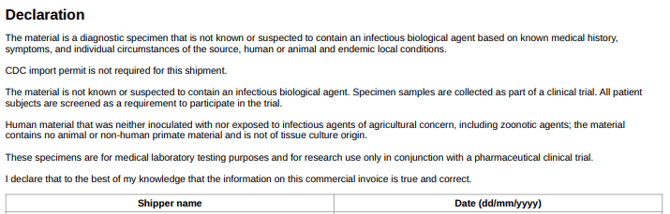
📣 Please note, it's very important that when the declarations are requested the specific format/line breaks are also requested or the text may be displayed in one block:
The material is a diagnostic specimen that is not known or suspected to contain an infectious biological agent based on known medical history, symptoms, and individual circumstances of the source, human or animal and endemic local conditions. CDC import permit is not required for this shipment. The material is not known or suspected to contain.....
Templates
For Automate customers, the software can be configured to generate commercial invoices according to a customer's design. The software has a powerful templating engine that allows a commercial invoice to be created in HTML with various dynamic fields to be populated with the details of the shipment package. The template file can be completed to your specification and include images, text and links.
🗣️ Please speak to your Customer Success Manager if you want to discuss a customised template.
Multi-lingual
Commercial invoice templates can also be multilingual; where 1 template has multiple language versions. All the text in the commercial invoice can be configured for different languages. The country of the shipment recipient dictates the language to use in the commercial invoice.
📣 Please note, the language of the shipment booking details (e.g. product description, recipient address) will not be translated.
Using fulfilment rules
Commercial invoice declarations and templates can be applied using fulfilment rules. These rules define conditions (such as product or destination) and trigger actions like adding declarations or selecting a customised template.
Typical rule matching conditions:
1. Product name and/or Product code
2. Destination address and/or Destination Country
Typical action:
1. Add declaration and/or use template
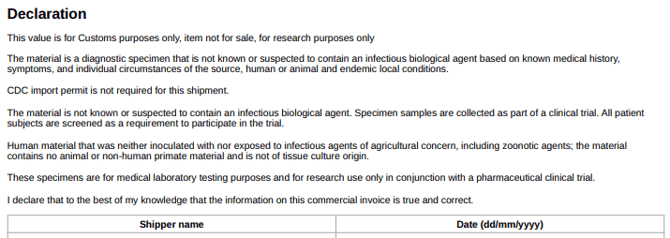
📣 Please note, depending on the conditions created, multiple different declarations and/or a customised template could be applied at the same time to a shipment, depending on the conditions:
🔎 Please contact Customer Support to discuss new fulfilment rules or updates to existing rules.
Can I see which fulfilment rule was applied to my booking?
Yes. Any matching fulfilment rules can be viewed in the shipping method section when booking a shipment: Which fulfilment rules were applied to a shipment?